How Credit4Ever uses Google Calendar
Our appointment system integrates with Google Calendar so consultants can sync their availability in real time, prevent double-booking with personal events, and automatically generate Google Meet links for client sessions. The integration is opt-in per consultant — only staff who explicitly connect their Google account are affected. Nothing about the integration is required to use the platform.
OAuth scopes we request and why
We follow Google's minimum-permission principle. The app requests exactly the scopes it needs and nothing more. All Google user data is handled in accordance with the Google API Services User Data Policy, including the Limited Use requirements.
https://www.googleapis.com/auth/calendar.events— Create appointment events on the consultant's primary calendar (with Google Meet link) and remove them when an appointment is cancelled. We only touch events the platform itself created.https://www.googleapis.com/auth/calendar.freebusy— Read busy/free windows from the consultant's calendars to prevent double-booking against personal events. We never read event titles, descriptions or attendees.openid + userinfo.email + userinfo.profile— Identify which Google account is connected so the consultant can verify and manage their integration. No profile data is stored beyond email and basic identification.
Limited Use commitment
Credit4Ever's use and transfer of information received from Google APIs adheres to the Google API Services User Data Policy, including the Limited Use requirements. Concretely:
- · We do not sell Google user data.
- · We do not use Google user data for advertising.
- · We do not use Google user data to train generalized AI or machine learning models.
- · No human reads Google user data, except with the account holder's explicit consent, for security purposes, to comply with the law, or on aggregated and anonymized data for internal operations.
- · Google Calendar tokens are encrypted at rest and stored per consultant, never shared across agencies.
Full disclosure in Privacy Policy section 4.
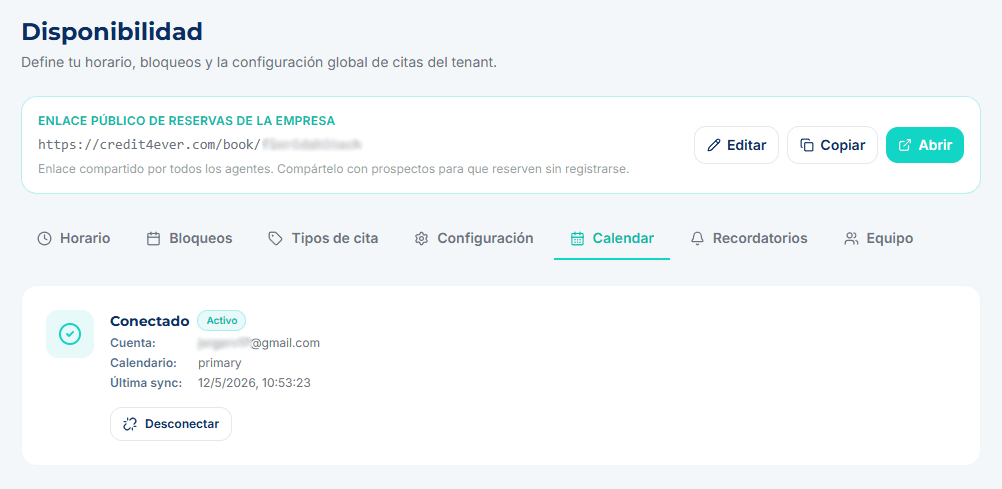
Disconnecting and deleting your data
A consultant can disconnect their Google account at any time from availability settings; the stored tokens are deleted immediately and the platform stops reading the calendar. Access can also be revoked from the Google Account permissions page. Deleting the Credit4Ever account removes any remaining Google credentials.